


Hale Alakaʻi is temporarily closed for electrical repairs. Read more for relocations and details.


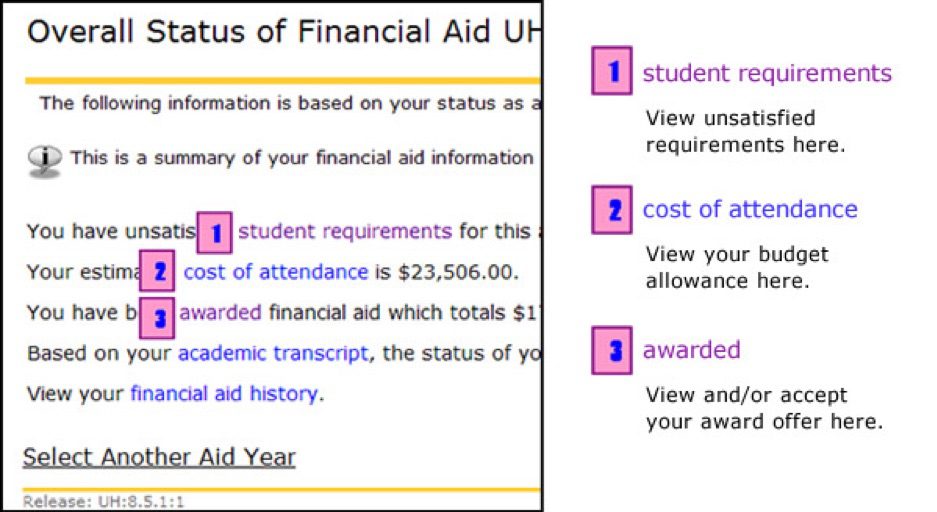

Click on each of the tabs to view your financial aid award details for this aid year. If you have questions regarding your award, please contact the Financial Aid Office. Select Another Aid Year
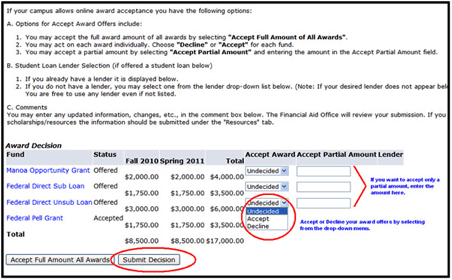
If you have active messages from Financial Aid Services, you will see the link in your “My Overall Financial Aid Status” Screen:
This is a summary of your financial aid information for the specified aid year. To obtain greater detail about any of the following summary statements, click the corresponding link.
You have unsatisfied student requirements for this aid year.
Your estimated cost of attendance is $26,066.00.
You have been awarded financial aid which totals $16,642.00.
Based on your academic transcript, the status of your academic progress is Eligible as of XXXXXX.
You have financial aid credits which appear within your account summary.
You have active messages.
View your financial aid history.
Reminder: It is your responsibility to periodically check student requirements and active messages for any updates to your financial aid status. All correspondence will be done via your hawaii.edu email account.


45-720 Kea‘ahala Rd., Kāne‘ohe HI 96744
phone: 808-235-7400
fax: 808-247-5362
© 2024 Windward Community College
An Affirmative Action, Equal Opportunity Institution